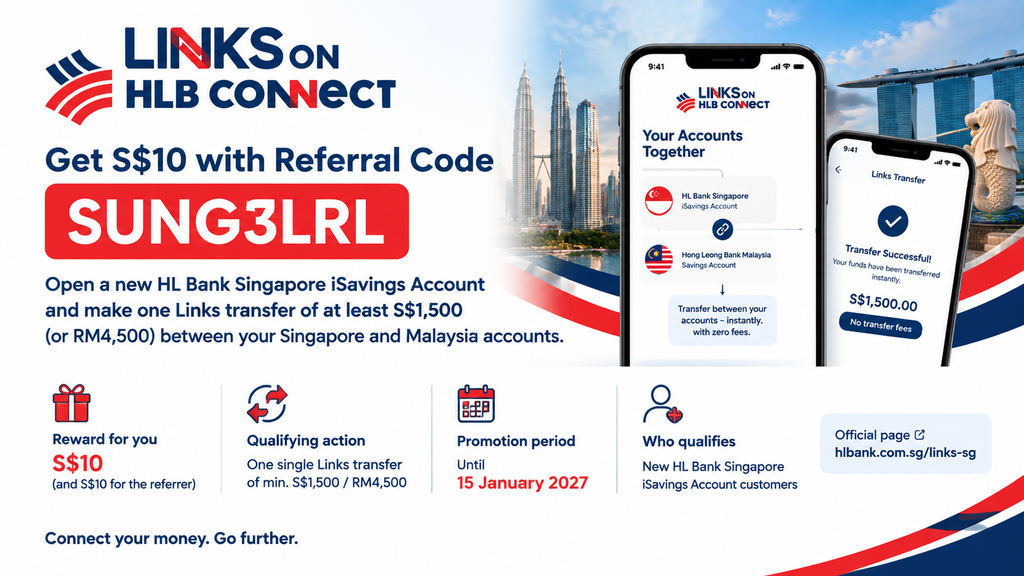
Use the Links on HLB Connect referral code SUNG3LRL to get S$10 when you open a new HL Bank Singapore iSavings Account and make one Links transfer of at least S$1,500 (or RM4,500) between your Singapore and Malaysia accounts. The promotion is for HL Bank Singapore customers and runs until 15 January 2027.
This deal only makes sense if you already bank with Hong Leong Bank in Malaysia and move money across the Causeway. That usually means Malaysians working in Singapore, or families with finances on both sides.
Referral code: SUNG3LRL Reward: S$10 for you (and S$10 for the referrer) Qualifying action: one single Links transfer of min. S$1,500 / RM4,500 by 15 Jan 2027 Official page: hlbank.com.sg/links-sg
What is Links on HLB Connect and why use it
Links on HLB Connect is a feature that connects your Hong Leong Bank Malaysia account with your HL Bank Singapore account. After linking, you see both accounts on one dashboard in the HLB Connect app, and you can move money between them in either direction.
What makes it useful:
- Zero fees on transfers between your own HLB Malaysia and HL Bank Singapore accounts
- Instant transfers, reflected in real time on both sides
- FX Friday rates: better exchange rates on Fridays, 9am to 5pm, for Links transfers from iSavings
If you send part of your salary home every month, Links competes with Wise and YouTrip. [link to: Wise referral code Singapore] [link to: YouTrip referral code Singapore]
The main limitation: Links only moves money between your own linked accounts.
Links on HLB Connect Referral Code: SUNG3LRL — What You Get
We received referral code SUNG3LRL from HL Bank Singapore in a marketing email in August 2026, under its “Refer more, earn more” campaign. According to that email:
| Item | Detail |
|---|---|
| Reward for you (referee) | S$10 |
| Reward for referrer | S$10 |
| Who qualifies | New HL Bank iSavings Account customers |
| Qualifying action | First single Links transfer of min. S$1,500 or RM4,500 |
| Deadline | 15 January 2027 |
| Overall cap | S$20,000 in total rewards, first come, first served |
The S$20,000 cap is shared by everyone, which is about 1,000 referral pairs, so don’t leave it until January.
How to Use the Links on HLB Connect Referral Code (Step-by-Step)
You need an active HLB Malaysia personal current or savings account with HLB Connect access before you start. If you don’t have one, you can open it through the Apply@HLB app.
- Open an HL Bank Singapore iSavings Account. Apply online. Singpass users can fill in the form with Myinfo. Without Singpass, you upload your documents instead. The minimum initial deposit is S$1,000.
- Set up HLB Connect Singapore. Download the HLB Connect Singapore app and activate your login.
- Link your accounts from the Malaysia side. In the HLB Connect Malaysia app, go to Overview → Links → HLB Singapore. Approve the request with AppAuthorise in both the Malaysia and Singapore apps, then log in to HLB Connect Online Banking Singapore to give the final authorisation.
- Wait for verification. New HL Bank Singapore accounts take 1–3 business days to verify before they can send or receive funds.
- Make one qualifying transfer. Send at least S$1,500 from SG to MY, or at least RM4,500 from MY to SG, in one transaction. Do it on a Friday between 9am and 5pm if you want the FX Friday rate.
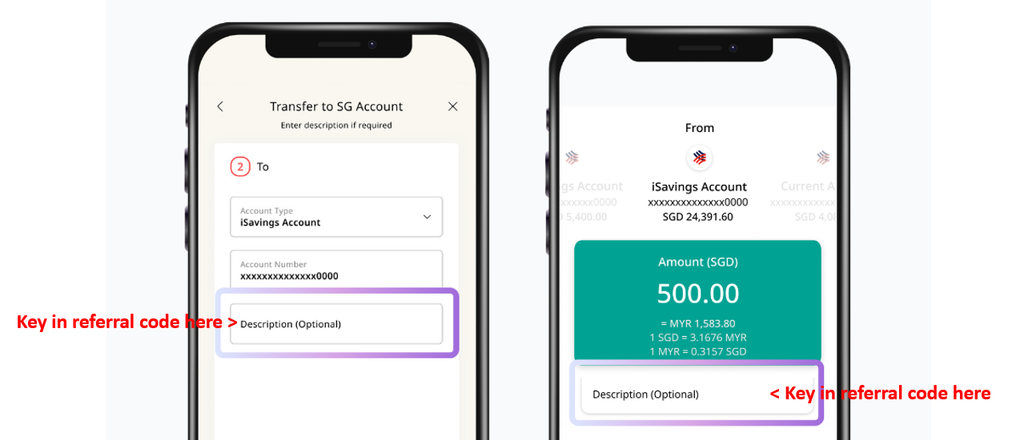
- Key in the code (see image below) when transferring.
- Receive S$10. The reward goes to both you and the referrer. The email does not give a crediting date, so check the full T&Cs on the official page.
Eligibility & Terms You Should Know
- New iSavings customers only. If you already have an HL Bank Singapore iSavings Account, you don’t qualify as a referee.
- Aged 18 and above. iSavings itself is open from 16, but Links needs you to be 18 or older.
- Individual accounts only. Joint accounts can’t be linked through Links.
- One single transfer. Several smaller transfers that add up to S$1,500 do not count.
- The sending currency decides. The minimum is checked against the amount you send when you start the transfer. If you send MYR, it must be RM4,500 or more, whatever the SGD equivalent.
- Early closure fee. iSavings charges S$30 if you close the account within 6 months of opening. That cancels out the S$10 reward if you open the account just for this promo.
- Deposit insurance. SGD deposits at HL Bank Singapore are insured by SDIC up to S$100,000 per depositor.
Is the Links on HLB Connect Referral Bonus Worth It?
S$10 is a small reward, and you need to park at least S$1,000 and move S$1,500 to get it. On its own, it isn’t a reason to open a new bank account.
It is worth it if:
- You already send money between Malaysia and Singapore regularly, and a S$1,500 transfer is something you would make anyway
- You want zero-fee transfers between your own accounts instead of paying remittance fees or spreads
- You plan to keep the iSavings account for more than 6 months
It’s not worth it if you have no HLB Malaysia account, or you would close the account soon after. In that case, a straightforward Singapore savings account referral pays you more for less effort.
How to Share Your Own Links on HLB Connect Referral Code
Once you’re an eligible HL Bank customer, the bank may send your own unique referral code by email, as it did with SUNG3LRL. Your code can also appear in the HLB Connect Malaysia app under Refer a Friend → Links on HLB Connect Referral. When you share it, tell your friend three things: open a new iSavings account, enter the code exactly, and make one transfer of S$1,500 / RM4,500. Splitting it into smaller transfers is the easiest way to lose the reward.
FAQ
Does the Links on HLB Connect referral code still work in 2026?
Yes. The HL Bank Singapore promotion runs until 15 January 2027, unless the S$20,000 reward pool runs out first.
How much do I get with the Links on HLB Connect promo code?
S$10, credited to both you and the person who referred you.
What is the minimum transfer amount?
S$1,500 or RM4,500, in one single Links transfer between your linked Singapore and Malaysia accounts.
Can I make several smaller transfers to reach S$1,500?
No. The promotion terms say cumulative transfers do not qualify.
Can I use the code if I already have an HL Bank Singapore account?
The S$10 reward is for new iSavings Account customers, so existing iSavings holders are not eligible as referees.
Do I need a Hong Leong Bank Malaysia account?
Yes. Links connects an HLB Malaysia account with an HL Bank Singapore account, so you need both, plus HLB Connect access on each side.
How long does the bonus take to credit?
The promotional email does not state a crediting date. Check the full T&Cs at hlbank.com.sg/links-sg, and keep a screenshot of your qualifying transfer.
Are Links transfers really free?
Yes, there are no fees for transfers between your own HLB Malaysia and HL Bank Singapore accounts. You still pay the exchange rate, which is better on Fridays from 9am to 5pm.
Is my money safe with HL Bank Singapore?
SGD deposits are insured by the Singapore Deposit Insurance Corporation for up to S$100,000 per depositor.
Get Your S$10 With Code SUNG3LRL
If you already move money between Malaysia and Singapore, this is S$10 for a transfer you would probably make anyway. Open your iSavings account, enter SUNG3LRL, link your accounts and make one S$1,500 transfer before 15 January 2027.
Referral code: SUNG3LRL · S$10 reward · Min. single transfer S$1,500 / RM4,500 · Ends 15 Jan 2027 Start here: hlbank.com.sg/links-sg